BLOGGING - CHOOSING YOUR TOPIC


First things first, we need to find a topic to base your blog around.The ideal scenario is to choose something you are passionate about and which there is also a large, profitable market for. An important piece of advice is to note rule anything out. Even the wackiest ideas and the tiniest niches can be highly profitable.


Choose your topic and search its demand on internet. As i told previously that a good blog is collection of topics.


A good place to start is to check out the number of searches on the Google ExternalKeywordTool (https://adwords.google.com/select/KeywordToolExternal) for a particular subject. 


Whilst it helps if you have an interest in the topic you choose, my advice would be to go for an ‘evergreen subject’ – one which never goes out of fashion and people ALWAYS have an interest in. They might not be particularly unique, but in my experience a blog on one of


The following subjects is sure to be popular:

  •  Money
  •  Dieting
  •  Health and Fitness
  •  Relationships
  •  Parenting

There is a lot of competition but that isn’t a bad thing. There are BUYERS in these niches


Here is list of blogging topics from which you may choose and start your blog today 


A High Traffic Niche via Keyword Research


Okay, so by this point you might have a couple of ideas in mind - maybe two or three? This is a way to narrow down that list and make your final decision. At the end of this process, I'd suggest you pick the one that has the most traffic potential and that you wouldn't mind writing about on a very regular basis. Take your list of ideas and think carefully about what people would type into the search engines to find the type of information you want to blog about.


Let's work through an example.


Let's say we want to blog about Online money. What would people type in the search engines to get more information on this subject?
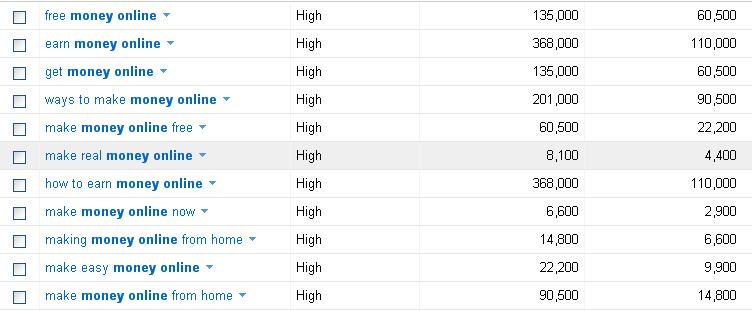

  • free money online 
  • earn money online
  • get money online 
  • how to earn money online 
  • make money online

You will need to take note of these keywords, so you can incorporate them into the titles and content of your blog posts, for a spot of essential SEO to get some search  engine traffic.

Making A Final Decision on Your Topic

Now, this is crucial...


If you procrastinate and are indecisive you’ll never make any money from this method. Don't fall at the first hurdle by not being able to make a final decision on the topic of your blog.


Be firm with yourself, make your final decision and stick to it! If you really can't choose between a couple of things, perhaps you can combine them on the one blog, as suggested earlier, for a unique approach. But remember once you have a routine of putting content on your blog, it's been monetized and you have got a steady stream of traffic, then there is nothing stopping you starting another blog and repeating the whole process.

That’s the beauty of blogging – they can be set up very easily and you can be making money from them VERY quickly indeed.

REVOLUTIONARY WIRELESS MOBILE PHONE TECHNOLOGY


When the first 2.2 pound weighing wireless hand-held mobile phone was demonstrated by Dr. Martin Cooper in 1973, it was a significance of revolution in technology and communication. Ever since, there has been a continuousgrowth in mobile phone subscriptions;and the increased demand in acquiring a mobile communication devicethat simplifies telephone usage, it has been able to penetrate the economywith great innovation.

The principle behinda mobile device’s working constitutes making or receiving a phone call over a radio link within a geographic area where a network provider allows access to the telephone network. This is unlike cordless phone where the coverage is withinlimited range.

Feature Phone

The low-end mobile phonesare called feature phones; they are the initially developed mobile phones and featured some of the basic components of the mobile telephones such as:

  • Input mechanisms for interaction between phone numbers with the help of a keypad. 
  • Making phone calls and sending text messages.
  • A battery as a source of power to perform functions
  • A SIM (Subscriber Identity Module) card that allows swapping between other mobile devices.


Fourth generation phone

The futuristic evolution of an ordinary phone over ages has led to today’s 4th generation 4G phones called the Smartphones that aim to provide broadband wireless network services. Today’s mobile technology has revolutionised the telecommunication servicesand offers much more for the convenience of a customer. Some of the capabilities of the latest Smartphones are: 

  • Operating System (OS): The functionality of an OS is to run applications 
  • Apps: Every phone has some software, but the innovation in software has the ability to do more. You can create, edit and view files on phones
  • Web: Earlier versions lacked the capability to access internet but today’s generation Smartphones have speed and accessibility of internet that challenges the conventional desktop net usage.
  • Large plus vivid display: The motto of the latest smartphonesis “a bigger and better view”and hence there is clearer display and brilliantclarity on a wide screen.
  • Voice integration: Smartphones now come with voice-activated assistance in handling the items of a phone without you having to lift a finger
  • Camera and video: Pictures look distinct and videos are dynamic due to the technological advancement in camera and video capturing that was unseen few decades earlier

  • Touchscreen: While numeric keypads were outdated and QWERTY just a few years old, touchscreen came as jaw-dropping revolution for mobile phones or rather on Smartphones


  • Hardware: There is a vital role played by the hardware in a cell phone’s performance.Fourth generation smartphonescome with powerful hardware built for multi-tasking and great gaming experience.


Author bio: Gemma Jones a Content writer and his interests are Technology, Phones, and Eco living, insurance, and Travel. Catch him @thetechlegend Twitter


BEST BLOGGING TOPICS


Do you want to start a blog ? Are you going to start a blog ? Are you having problem in blog topics? 

If you are going to start a blog or you are facing any problem in blogging , here it is where you need to start .I have written this article for all those who are going to start a blog and are thinking on what topic they should start their blog.Well blogging is a very vast field to start and there are many ways and many problems while blogging.

Some of you would be searching for the topic on which they should start there blog so here is very good and a very big list for all of you , choose any of the topic and just start.

I would like to tell that just dont blog on any one topic , where as you just choose some two or three topic and make a mix of them and then start.This will help you in resolving many problems such as inavailability of information in any specific field.If you choose more than one topic to blog then it will help you in getting more traffic to your blog,and you will post many articles and of different variety.

List of topics to blog on :

Technology

  • Cameras
  • Communication Devices
  • Companies
  • Electronics/Gadgets
  • Engineering
  • Innovations
  • Mobile
  • Networking
  • News
  • Tools

Society/Culture
  • Adoption
  • Charity
  • Civilization
  • Community Development
  • Controversy
  • Criminal Justice
  • Death
  • Ethnic Issues
  • Family Issues
  • Feminism
  • Genealogy
  • GLBT
  • Men
  • Mythology

Environment
  • Activism
  • Ecosystems
  • Environmental Education
  • Global Warming
  • Green Living
  • Industry
  • Nature
  • Weather

Food & Drink
  • Baking
  • Cake Decorating
  • Dining
  • Entertaining
  • Healthy Eating
  • International
  • Organic Cooking
  • Recipes
  • Wine


Shopping
  • Books
  • Cameras
  • Clothing
  • Coupons
  • Children’s Products
  • Fashion
  • Fine Living
  • Gadgets/Tech
  • Gifts
  • Home Decor
  • Music
  • Office

Computers
  • Hardware & Software
  • Privacy
  • Security
  • Tutorials


These topics are which are in demand these days so these topic are just as a hint for all the bloggers to start up with.You are not bound to select any specific topic of these just take  a hint ,make up a comibnation of some great topics and just bang !!! .HAPPY BLOGGING  


BEST PAYMENTS SYSTEMS AVAILABLE


There are many online payment system available which allow you to make online payment and buy products for .But have you ever thought that the payment service you are using is SECURE ? is it SAFE ? .So now you need not to worry about its because here is list of few best online payment systems which make your payment secure and safe.With these sites you need not worry about you money as your payment is secure and safe and confirm.

Here is list of few best payment systems:

PAYPAL: PayPal is the world’s most widely used payment acquirer, processing over $4 billion in payments in 2011. PayPal payments are made using a user’s existing account or with a credit card. Money can be sent directly to an email address, thus prompting the users to sign up for a new PayPal account. In addition to taking payments, PayPal also allows its users to send money through the service, which is a feature that only a few payment solutions provide.

Pricing: PayPal takes 2.9% + $0.30 per transaction and has no setup or monthly fees


AMAZON PAYMENTS: Amazon Payments allows its users to receive money using its API (and to send money out via ACH). Popular crowdfunding site Kickstarter uses Amazon Payments.

Pricing: Amazon Payments fees start at 2.9% + $0.30 per transaction for payments over $10 (the percentage they take is less for larger transactions). For payments under $10, the fee is 5.0% + $0.05 per transaction


WEPAY: WePay is a payment processor that allows Internet merchants to accept credit cards and bank account payments online. WePay seems to be focused on the individual user, and has recently added e-store pages to their service to help their customers conveniently take in payments (e.g. event tickets, products, donations and so forth) through their service.

Pricing: WePay charges a 3.5% transaction fee (with a $0.50 minimum) for credit card transactions and $0.50 for bank payments, with no setup or monthly costs


BRAIN TREE: Braintree is an online payment gateway and merchant account solution known for working with popular tech startups such as Airbnb and LivingSocial.

Pricing: Braintree has a $35 monthly fee (with a $75 monthly minimum). Transaction fees start at 2.29% + $0.30 per transaction for qualified cards.


GOOGLE CHECKOUT: Google Checkout is Google’s answer to PayPal. Google Checkout allows users to pay for goods and services through an account connected to their Google profile. The major benefit that Google Checkout has over the competition is that millions of Internet users use Google for other services, making a purchase through Checkout a simpler process.

Pricing: Google Checkout fees start at 2.9% + $0.30 per transaction for sales less than $3,000. The percentage they take goes down depending on monthly sales volume


INFLUENTIAL BLOGGING TOOLS FOR ANDROID SMARTPHONES


Advent of smartphones has made many spheres of life easy. From online shopping, to banking, handling daily chores all can be done from a touch on your cell phone screen. Supporting fast internet speed, modern browsers, high definition cameras and robust apps smartphones has changed the blogging business revolutionary. Now bloggers don’t have to sit in front of their PCs or laptops and make posts or uploads images. All this can be done from their smartphone.  Indeed advanced blogging functions, writing posts to uploading images and videos all can be done even when a blogger is travelling.

Being an ardent Android Fan I will share of the high quality Android apps that are must for every blogger.


Mange Your Blogging


WordPress App: This app allows you to manage all your wordpress blogs from your phone. It provides all those wordpress tools which are available in its online version. From creating new posts to managing all the comments you received on your posts, to uploading multimedia files on your blog all can be done through this app. You can also analyze your blog visitor’s statistics from it. And it is a FREE app.  

Text Editors

QuickOffice App: Many bloggers prefer to first write their post in word and then paste it to the html editor of their blog. Then this app is for you. In this paid App ($14.99) you can connect with your dropbox, Google Docs and other online document sharing site accounts. 

Writer App: If you like to write your posts in plain text editors than instead of paid word docs, you can use this FREE writer app which provides you with simple, free plain text editor. 

DroidEdit Pro App: This one is my favorite. This app provides you with best of the environment for writing and editing your HTML posts. Bloggers liking hi-fi features will love this app because of its syntax-based color-coding, keyboard shortcuts, HTML previews, and connections to Dropbox features. But for all this one has to pay the price of ($1.69) which is worth spending.

Image Editing

FX  Photo Editor App:  This paid ($3.99) android app can make image editing an easy task for bloggers using android smartphones. In this app you will find options for image editing like resize, rotate, crop and many more complex process.

Photoshop Touch App: This one is perfect for android tablets. Taking flexibility of your bigger screen you can add layers to your images with this app for which you have to pay $9.99.

Analytics and Social Media


gAnalytics App: This free app gives you the mobile version of your Google Analytics. With this you can manage all your analytics accounts from your smartphone.  

Hootsuite App: Sharing a blogpost in social media is good for blogging. So to continue that from your android phone Hootsuite is a good option. Professional bloggers can add their social media profiles for Facebook, LinkedIn and twitter at one place and can manage all from social media management dashboard of the FREE app. 

File Management


Explorer + File Manager Pro App: After paying $3.99 for this app one can directly access all their files from their android phone.

FTP Café App: If you want to manage your ftp from your phone this app is apt for that. At the cost of $3.99 FTP Café offers you all the functions which an FTP can do from file upload to download.

Notes and Reading

gReader Pro App: Pay $5.99 and get this gReader Pro App in your android phone which wil let you e-read through your favorite blogs.

Evernote App: This is a FREE cloud-based notes App in which you can make endless notes.


Author Bio: Catherine Jones writes for residential voip home phone service. She is a freelance blogger and likes to write about various topics like social media, latest technology trends.

CYBER SHAFT MOBILE

       
Mobile version of Cyber Shaft has been been released and now all our user can view our blog on there mobile also.

You can also scan the QR-Code which has been provided below and connect with Cyber Shaft.


HACK FACEBOOK AND OTHER IDs


It is very easy hack any ones password if you can work on any one laptop or his desktop where your VICTIM(whose password you want).


There are many software which record the key strokes of computer keybord and save them in the log file ,so if you want to hack your VICTIMS ID just install a software know as keylogger on his computer or laptop and change the properties to hidden and other changes which ever you want to make .


You can search on google for different keylogger software, the one which i recommend is Silent Keylogger it has some good features and so try if you can get the cracked version, then download it and just instal it on the victims system. 


And then if you will check the log file you can see all his e-mail ids and also the password and all other information.


NOTE : THIS INFORMATION IS FOR ETHICAL PURPOSE AND DONT USE TO HARM ANY ONE  BE A GOOD HACKER